
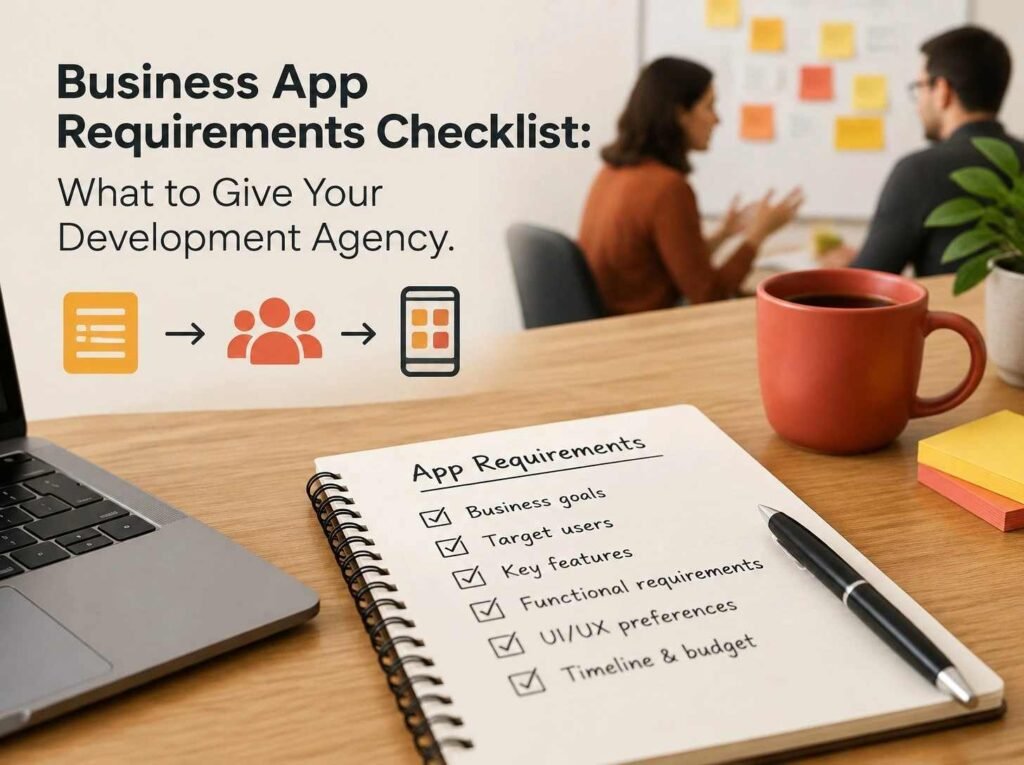
Business App Requirements Checklist: What to Give Your Development Agency is an important starting point for businesses planning to turn an idea into a functional mobile or web application. Business owners should get their message across to developers before they start any development work on the app as to what they want the application to do, who they are going to use it for, and how they will use it on a day-to-day basis. Provide this information early to a development team so they can better understand the project, determine technical needs, define the scope, and plan the project’s development process.
A lot of businesses start an app project with a notion and don’t have adequate details to do the task. They might be aware they require an ordering platform, a booking system, a customer portal, or an internal application to manage all of their activities, but they have not clearly outlined the activities, features, or user expectations. This can cause miscommunication in the project, scope changes, cost overruns, and delays.
When approaching a seasoned App Development Agency Buffalo, NY, it is important for businesses to be prepared with the necessary information to convey their needs. This guide is a practical list of the documents, decisions, business information and technical information to get ready before giving a project to a development agency.
A Clear Description of Your Business and App Idea
The initial thing to supply is a fundamental description of your business and also the rationale for creating an application.
Before making recommendations for features or technical solutions, an agency should grasp the business environment. Depending on the services, customers, and business model of these companies, the same kind of application can have distinct requirements.
For example, a restaurant intending to develop an application for ordering may require things such as menu management, online payment, tracing of deliveries, and order notifications. A medical company could require appointment scheduling, patient accounts, and secure access to pertinent details.
Prepare the following details:
- Business name and industry.
- Products or services offered.
- Main business activities.
- Current methods of serving customers.
- Problems you want the application to solve.
- Reasons for choosing an application instead of another solution.
- Expected improvements after launch.
There is no need to give a long business report! A brief statement of your operations and project objectives can provide a helpful guide for the development team.
2. Define Your Target Audience
People should be the basis for an Application’s design. During the development process, you must consider your target users and describe what they will expect from your application.
Users may belong to different groups, and each group might have different expectations, technical skills, and motivations for using your site.
For example, reporting, invoicing, and account management may be more important in an application for a small business owner. A customer-facing retail app can be as simple as a product finder, an easy checkout app, or an order tracking app.
Consider these questions:
- Who will use the application?
- Are your users customers, employees, business partners, or administrators?
- What age groups are you targeting?
- Will users access the application through smartphones, tablets, or computers?
- Are users familiar with similar applications?
- What problems should the application solve for each user group?
Example Target audience table:
| Business type | Target users | Main user expectations |
|---|---|---|
| Retail business | Online shoppers | Product browsing and checkout |
| Restaurant | Customers and delivery staff | Ordering and order updates |
| Healthcare provider | Patients and administrators | Appointment management |
| Service company | Customers and employees | Booking and service tracking |
| Education provider | Students and instructors | Learning materials and progress |
Knowing who they are leads the agency to make an informed choice on navigation, accessibility, function, and overall user experience.
3. Prepare a List of Required Features
One of the best documents to provide a development agency is a feature list. Describes what the application lets the user do.
Don’t just state that your app is a booking app or business management tool; rather, demarcate its functions.
For example, a booking application could need:
- Registration and login for users.
- Service selection.
- Available appointment times.
- Online payments.
- Booking confirmation.
- Appointment reminders.
- Cancellation options.
- An administrator dashboard.
Separate your requirements into three categories.
| Priority | Meaning | Example |
|---|---|---|
| Must-have | Essential for the first release | User registration and payments |
| Should-have | Important but not essential immediately | Automated email reminders |
| Nice-to-have | Additional functionality for future releases | Loyalty points and advanced recommendations |
This categorization allows us not to have any unnecessary features expand the initial project.
It also provides the agency with a better idea of what parts of the functionality to include in the first development phase and what parts to look at in the later phase.
4. Explain User Roles and Permissions
Not all users of an application have to be given the same features. Customers, employees, managers, and administrators may all be involved in a business application, with each having its own responsibilities.
For example, if a customer wants to know what has happened to their order, they could need to check its status, and an employee might need to put the status of the order. Administrators might need to view customer records, reports, settings, and user management.
Create a list of the user roles and describe what the user role can do before development begins.
Example user permissions:
| User role | Possible permissions |
|---|---|
| Customer | Create an account, place orders, view history |
| Employee | View assigned tasks and update progress |
| Manager | Monitor operations and review reports |
| Administrator | Manage users, settings, and application data |
Any actions that require further approval should also be determined.
For example, can users have the ability to remove customer data? Are refunds approved by managers? Can payment settings be changed by anyone other than administrators?
Clarifying permission requirements enables developers to implement proper access control measures and avoid confusion in the process.
5. Share Your Design References and Branding Materials
The agency should know what you’re looking for in terms of aesthetics and interactivity. As long as you don’t have a finished design, you can make the communication easier if you can provide visual references too.
When beginning, first gather the following branding materials and examples of applications you like.
Useful materials include:
- A company logo in a good quality format.
- Brand colour and typography.
- Existing website design.
- Images of the products and other visual representations.
- Ideal icons, artwork or illustrations.
- A list of screenshots for applications that you use for reference.
- Examples of layouts or navigation styles that you like.
You should also explain what you like about each reference.
For example, you may like the ease of use in one app, while you’d like the product display layout in another.
These references provide your agency with insight into your expectations without having to design the entire project.
If you already have wireframes, sketches, or screen designs, share those as well.
6. Identify the Platforms and Devices You Want to Support
Determine what areas users will be able to access the application first, before asking for a development estimate.
There are businesses that require a cellular software application for Android and iOS. There are others who just need a web app which operates in a browser. Some projects can take advantage of both mobile and web platforms.
Your choice should take into account customer and employee use of the system.
| Platform | When it may be suitable |
|---|---|
| Android | Businesses targeting Android smartphone users |
| iOS | Businesses serving Apple device users |
| Web application | Users who need browser-based access |
| Admin web dashboard | Managers who handle business operations |
| Cross-platform mobile app | Businesses seeking one shared development approach for Android and iOS |
Any device-specific requirements should be identified as well.
For example, will the application require camera, GPS location, barcode scanning, push notifications, or offline capabilities?
Giving these details enables the development agency to assess appropriate technologies and what work it entails.
7. Document Payment and Financial Requirements
Include details on how customers or business users should make payments if your application will be used for handling payments.
Rental requirements may impact the architecture, security, third-party integrations, and development expenses of the application.
Let’s look at this with the following questions in mind:
- Will users pay through the application?
- Do you need one-time payments or recurring subscriptions?
- Which currencies will the application support?
- Do you need invoices or digital receipts?
- Should users be able to request refunds?
- Do you need payment confirmation notifications?
- Will the application support discounts or promotional codes?
If you have chosen your payment providers, you should also determine yours.
For example, if you’re running a retail business, you need a payment gateway, and if you’re running a subscription business, you need recurring billing and subscription management.
The development agency can assist you in determining what providers are suitable for your enterprise and audience.
Never pass along passwords, regular API keys or payment account details in regular project documents. Secure access arrangements should be agreed upon when integrations are implemented.
8. Provide Information About Third-Party Integrations
There are many business applications that require them to use services outside the application itself. These integrations enable the exchange of information and the execution of actions between different systems, without development from scratch.
For example, an application can interface with a payment gateway, email system, accounting platform, CRM, mapping system, or inventory management system.
Make a list of the tools you are using in your business and explain whether you need to integrate the new application with them.
Common integration requirements:
| Integration | Business purpose |
|---|---|
| Payment gateway | Process online transactions |
| Email service | Send confirmations and account notifications |
| SMS provider | Deliver verification codes and reminders |
| Google Maps | Display locations and support navigation |
| CRM software | Manage customer information |
| Accounting software | Support financial record management |
| Analytics tools | Monitor application usage |
| Cloud storage | Store and retrieve digital files |
Let the agency know if you have any subscriptions or accounts with these providers.
Also describe if the application requires importing existing information, exporting reports, or automated synchronization.
This information can be used to determine what components are required to be integrated before the implementation process starts.

9. Explain Your Data and Information Requirements
Each and every enterprise application stores data in a unique manner. Some applications retain customer profiles, and others deal with product inventories, bookings, payments, documents, or employee records.
The development team should know what data the app will collect, display, update and save.
Make a list of fields of information to consider.
For example, a customer administration program might need:
- Customer name.
- Email address.
- Contact number.
- Account details.
- Purchase history.
- Communication preferences.
The product name, product description, inventory amount, product pricing, and supplier information are all valuable data in an inventory application.
Also, you need to describe:
- Which information is mandatory.
- Which information is optional.
- Who can view or update each record.
- Whether existing data needs to be transferred.
- How long information should be retained.
- Whether users need options to update or delete their information.
If the application is dealing with personal or financial information that is sensitive, explain this during the initial application. When designing the system, the agency should take into account the privacy and data protection requirements that may be applicable.
10. Identify Security and Privacy Expectations
Security is not an afterthought, but should be taken into account before development.
A business application can include personal information, customer interactions, transaction details or internal company records. Improper access controls and data management practices can increase risk.
Describe the protection level you need in your application.
Important considerations include:
- Secure account registration and authentication.
- Password protection and recovery.
- Role-based access permissions.
- Secure communication between the application and server.
- Appropriate data encryption.
- Backup and recovery procedures.
- Session management.
- Protection against unauthorized access.
- Privacy notices and user consent where required.
Some applications might also require multi-factor authentication, audit logs or extra verification for critical activities.
For businesses with multiple regions, determine the regions where user multi-factor authentication needs to be managed. This assists the development agency in determining applicable privacy and regulatory requirements.
The final security method should be decided upon depending on the feature set of the application, the sensitivity of the data and business need.
Conclusion
Creating a thorough requirements document can help streamline and organize the business app development process. By figuring out your target audience, outlining key functionalities, outlining integrations, security expectations, and support after the launch, every detail assists the development group in realising your objectives.
Businesses do not have to bring the final technical specifications or design. The key is to have a clear understanding of the problem to be solved, the users, and the functions needed to solve it.
Before reaching out to an App Development Agency Buffalo, NY, have your business information, feature list, design samples, budget, and timeline ready to go. This process helps build a better basis for project meetings and discussions, and helps set realistic expectations for both sides.
A clear starting point helps assess development proposals, compare solutions, and progress towards an application that aids business operations and future growth.
Frequently Asked Questions
01 What should I prepare before contacting an app development agency?
Prepare a business overview, application idea, target audience information, feature list, design references, preferred platforms, estimated budget, and expected timeline. Existing technical documents and integration requirements are also useful.
02 Do I need technical knowledge to explain my app requirements?
No. You only need to explain your business goals, user needs, and expected application functions. The development agency can help translate these details into technical specifications and recommend suitable technologies.
03 How detailed should my app feature list be?
Your feature list should describe the main actions users need to perform. Group features into must-have, should-have, and nice-to-have categories so the agency can understand your priorities.
04 Should I have a design ready before approaching a development agency?
No. You can provide sketches, screenshots, branding materials, or examples of applications you like. The agency can help create wireframes and user interface designs based on your requirements.
05 How do I estimate the budget for a business application?
The budget depends on application complexity, platform requirements, design, integrations, security, and ongoing maintenance. Request a project estimate after discussing your essential features and expected deliverables.
06 Why should I identify user roles before development begins?
User roles help define who can access different application features and information. Identifying these permissions early supports better system planning, security, and user experience.
07 Should application maintenance be discussed before development starts?
Yes. Discussing maintenance early helps clarify responsibilities for updates, technical support, server monitoring, security improvements, and future feature development.
08 What happens if I want to add features after development begins?
Additional features may affect the original project scope, budget, and timeline. Discuss the proposed changes with the agency so both parties can evaluate their impact before approving the work.
09 How can I compare proposals from different app development agencies?
Compare proposals based on their understanding of your requirements, proposed functionality, technology recommendations, project milestones, estimated costs, communication process, ownership terms, and post-launch support. The lowest estimate may not always provide the most suitable solution.
10 How long does it take to develop a business application?
Development time varies depending on the number of features, design complexity, integrations, testing requirements, and platforms involved. A simple MVP may take considerably less time than a complex application with multiple user roles and external system integrations. Ask the agency for a project-specific timeline.